
E-Invoicing Compliance Dashboard for Real-Time Monitoring

An e-invoicing compliance dashboard helps businesses monitor invoice validation, submission statuses, errors and audit records through a centralized compliance automation platform.

Trusted Compliance Coverage

Compliance Risk Hides In Scattered Statuses

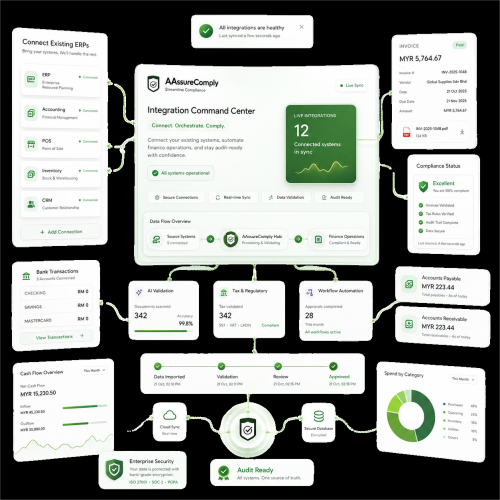
eInvoice compliance becomes difficult when every status sits in a different system. One invoice may be stuck in validation. Another may be rejected. A branch may have missing buyer details. A country workflow may need review. A finance user may be waiting for approval before submission. Without one dashboard, teams spend too much time chasing updates and too little time fixing the right problems. AassureComply brings invoice compliance activity into one view, so teams can act before exceptions become reporting issues.

three img

Dashboard Views For Faster Compliance Action

AassureComply gives teams clearer visibility into invoice activity, errors and submission progress.

Invoice Status View

Track draft, validated, submitted, rejected, corrected and action-required invoice records.

Entity Compliance View

Monitor invoice activity by company, branch, country, customer or operating unit.

Validation Error View

See missing fields, wrong tax codes, unsupported formats and data issues quickly.

Exception Queue

Group failed invoices, approval delays, rejected records and unresolved workflow items.

Submission Tracking

Follow invoice submission progress across supported eInvoice workflows and networks.

Built For Teams Managing Compliance Visibility

AassureComply helps every team involved in eInvoice operations see the same source of truth.

Other PEPPOL Markets

Add supported countries after coverage is verified by product and compliance teams.

Country Coverage Areas

For Finance Teams

See which invoices are validated, pending, rejected or ready for correction.

For CFOs

Review entity-level compliance status, invoice exceptions and reporting exposure faster.

For Tax Teams

Monitor tax code issues, missing buyer data and country-specific compliance gaps.

For Compliance Leaders

Track audit evidence, approval activity and unresolved exceptions more clearly.

For Multi-Country Businesses

View compliance activity across markets, branches and entities from one place.

From Invoice Activity To Compliance Insight

AassureComply helps teams turn invoice activity into useful compliance visibility.

B2G Use Cases

Step 1: Capture Invoice Events

Bring invoice creation, validation, approval, submission and rejection activity into the dashboard.

Step 2: Group By Status

Separate successful records, pending items, failed validations and action-required invoices.

Step 3: Review Exceptions

Identify missing data, rejected invoices, delayed approvals and country-specific workflow gaps.

Step 4: Assign Follow-Up

Route issues to finance, tax, operations or technical users for resolution.

Step 5: Track Resolution

Keep corrections, approvals, resubmissions and audit history connected to each record.

e invoicing

Connect Dashboard Data With eInvoice Workflows

Workflow Areas

Integration Areas

7
4
5
8
3
1
2
6

Plans For Dashboard And Compliance Control

Start with invoice status visibility and scale into validation dashboards, exception tracking, entity-level reporting, audit trails and multi-country compliance automation.

e-invoice

Frequently Asked Questions

What is an e-invoicing compliance dashboard?

An e-invoicing compliance dashboard is a centralized interface for monitoring electronic invoice processing and related compliance activities. Depending on the platform, it can display validation outcomes, submission statuses, rejected invoices, entity-level reporting and audit information. Finance teams use these views to identify problems, prioritize corrections and monitor operational compliance.

Why does invoice status visibility matter?

Invoice status visibility matters because failed validations, missing data and rejected submissions can delay reporting and create manual rework. A dashboard helps teams identify problems earlier instead of chasing updates across multiple systems.

Can AassureComply show validation errors?

Yes. AassureComply can show validation issues such as missing fields, incorrect tax codes, unsupported formats, incomplete buyer details and action-required invoice records, helping teams resolve exceptions before they grow.

Does this support multi-entity visibility?

Yes. AassureComply can support entity-level compliance visibility across companies, branches, countries and operating units. This helps CFOs and finance leaders see where invoice compliance activity needs attention.

Can the dashboard connect with ERP systems?

Yes. AassureComply can connect dashboard visibility with ERP, accounting, POS, marketplace and custom system data through integrations and APIs. Exact setup depends on invoice sources, entities and workflow requirements.