
Chart of Accounts Software for Financial Control

Build, manage and standardize your chart of accounts across entities, branches and reporting workflows.

Trusted Compliance Coverage

Why a Structured Chart of Accounts Improves Financial Control

A structured chart of accounts organizes every financial account into clear categories such as assets, liabilities, equity, income and expenses. AassureComply helps finance teams standardize account codes, maintain consistent classifications and connect account structures with reporting workflows, giving businesses clearer financial records, stronger control and more reliable reporting across day-to-day accounting operations.

three img

Core Chart Of Accounts Capabilities

AassureComply gives accounting and finance teams the controls needed to manage account structures with consistency.

Account Classification

Organize assets, liabilities, equity, income, expenses and other accounts clearly.

General Ledger Mapping

Connect accounts to ledgers, reports, entities and transaction workflows.

Reporting Control

Improve financial reporting by keeping account categories and mappings consistent.

Multi-Entity Structure

Standardize account structures across companies, branches and operating units.

Audit-Ready Records

Maintain clearer account history, changes, classifications and supporting finance records.

Built For Finance Teams That Need Control

AassureComply is built for teams that want accounting structure, reporting clarity and better governance.

Other PEPPOL Markets

Add supported countries after coverage is verified by product and compliance teams.

Country Coverage Areas

For SMEs

Set up clean account structures without relying on spreadsheets or inconsistent manual naming.

For CFOs

Improve visibility across accounts, entities, reports and compliance workflows.

For Accounting Teams

Reduce duplicate accounts, mapping errors and month-end reporting cleanup.

For Multi-Entity Businesses

Standardize account structures across entities while keeping local reporting needs visible.

For Compliance Teams

Keep account-level evidence, structure and changes easier to review during audits.

How Chart Of Accounts Management Works

AassureComply helps teams move from scattered account lists to structured finance control.

B2G Use Cases

Step 1: Define Account Structure

Create account categories, codes, names and reporting groups based on business needs.

Step 2: Map Ledger Accounts

Connect accounts to general ledger workflows, transaction types and reporting lines.

Step 3: Apply Entity Rules

Manage account structures across companies, branches, locations and operating units.

Step 4: Review And Control Changes

Track updates, account changes and approval activity for stronger governance.

Step 5: Use Accounts In Reporting

Support cleaner financial reports, reconciliations and compliance reviews.

Home Image 3 2

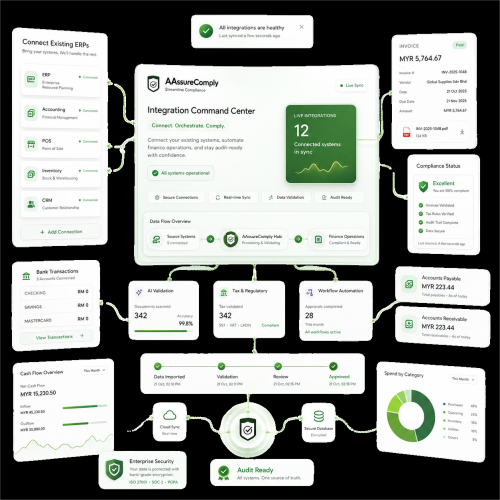
Connect Accounts With Finance Workflows

Workflow Areas

Integration Areas

7
4
5
8
3
1
2
6

Plans For A More Structured Chart of Accounts

Start with a clear account structure and scale into multi-entity account mapping, standardized classifications, financial reporting controls and audit-ready account management.

Untitled design 2024 12 30T161850.682

Frequently Asked Questions

What is chart of accounts software and how does it work?

Chart of accounts software is a system for creating, organizing and controlling the accounts a business uses to classify financial transactions. It groups accounts such as assets, liabilities, equity, income and expenses into a consistent structure. AassureComply helps finance teams standardize account codes, maintain clearer classifications and connect account structures with reporting, reconciliation, compliance and multi-entity finance workflows across teams.

What is the difference between a chart of accounts and a general ledger?

A chart of accounts defines the account structure used to classify transactions, while the general ledger records the actual debit and credit activity posted to those accounts. The chart provides the categories and account codes; the general ledger contains the transaction history and balances. Connecting both correctly helps finance teams maintain consistent bookkeeping, improve reconciliation and produce more reliable financial statements and management reports.

What account types should a chart of accounts include?

Most charts of accounts include five core categories: assets, liabilities, equity, income or revenue, and expenses. Businesses may add subaccounts for departments, locations, projects, tax categories or reporting needs. The structure should be detailed enough to support accurate reporting without creating unnecessary duplicate accounts. A consistent hierarchy also makes account mapping, month-end review and financial analysis easier as the business grows.

How should a multi-entity business structure its chart of accounts?

A multi-entity business should use a chart of accounts structure that creates consistent group-level reporting while preserving entity-specific requirements. Shared account categories and naming standards improve comparability, while local accounts can support different operations, taxes or reporting needs. AassureComply can help finance teams manage standardized account structures across companies, branches and operating units without losing visibility into entity-level financial activity.

Is chart of accounts software useful for CFO reporting?

Yes. A cleaner chart of accounts gives CFOs better visibility into financial performance, entity-level reporting, account classifications and compliance records. It helps reduce reporting inconsistency across teams and business units.

Can chart of accounts software integrate with ERP and accounting systems?

Yes. Chart of accounts software can connect with ERP and accounting systems so account codes, classifications and mappings remain aligned across finance workflows. Integration helps reduce manual remapping when invoices, journals, payments or other transactions move between systems. AassureComply can connect account structures with broader finance and compliance workflows, helping teams maintain more consistent data across accounting, reporting and operational processes.

What should CFOs look for in chart of accounts software?

CFOs should look for chart of accounts software that supports clear account hierarchies, controlled changes, multi-entity structures, reporting mappings, audit visibility and integration with existing finance systems. The software should make account structures easier to govern without creating unnecessary complexity. For growing organizations, consistent classification across entities and reporting periods is especially important because it improves comparability, financial control and management reporting.